
{{brizy_dc_image_alt imageSrc=

From compliance to analyzing risks and finances, all in a single PPM solution

Use Envision Data Transformer and Proteus Integrator to gain insights from any data source then build clear, actionable dashboards in minutes - no coding required

Become

0%

Government Compliant

Envision Dashboard Apps

specific applications designed for Government Contractor use cases, programs and processes.

Complete Solution

Supports distinct and separate missions of your offices, while potentially being a single, integrated system with the capability to maintain separate "silos" for each office

Use Proteus Integrator to connect your sources, then visualize with Envision Dashboard Apps

Your data visualization and analysis across all project stages with our comprehensive Envision Dashboard App Collection tailored for Government Contractor use cases.


From start to finish, use a single solution throughout the entire PM Lifecycle.

{{brizy_dc_image_alt imageSrc=

Support for Federal and Enterprise Standards

All formats are written to reflect the originating data source at 100% confidence and compliance.

Data Conversions made easy

Even the most complex data structures are no match for Proteus Integrator and Envision Data Transformer. Proteus Envision seamlessly adapts to unique schemas and integrates diverse data sources

A single solution for

the whole project lifecycle

Key Features

On Premise or in the cloud

Freedom to choose your preferred deployment option, ensuring optimal accessibility and control.


RiskyProjects Integrations

Integrate with RiskyProjects for identification of risk, schedule analysis, Monte Carlo analysis, and cost & schedule analysis.
{{brizy_dc_image_alt imageSrc=
Automations

Set up automated tasks, notifications and visualization coloring to be alerted if specific events or thresholds are triggered.

Complete PPM Solution

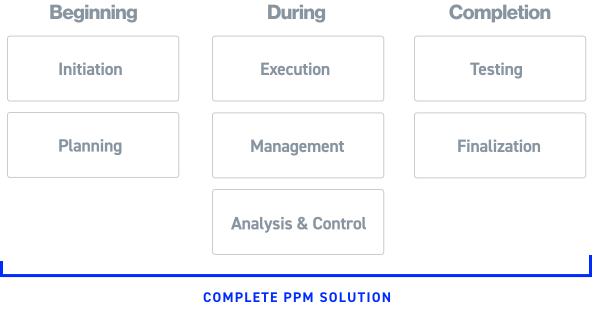
From initiation to planning, execution, management, testing, analysis & control once your data is connected we help you see it all in one place.

Data Health Checks

Detect bad or corrupted data based on the criteria that you specify. Quickly remove it without disruptions.

Compliance Failure Detection

See instantly when something fails compliance and act quickly.

Don’t see a feature here? Get in touch to see our full capability list.

Use Cases

  • IPPM
  • Risk Analysis
  • DCMA Compliance
  • IBR Preparation
  • Systems Engineering
  • Contract and Portfolio Management
IPPM

IPPM Applications Suite Library

Utilizes data from legacy schemas including the DoD IPMR and IPMDAR to provide a comprehensive EVM, Schedule, and Risk analysis capability.

IPPM Applications Suite Library

Utilizes data from legacy schemas including the DoD IPMR and IPMDAR to provide a comprehensive EVM, Schedule, and Risk analysis capability.

  • Filter by role:
  • Compliance Management
  • Executive Management
  • Program Management Teams
  • Control Account Manager
  • Risk Analyst
  • Systems Engineer
  • Schedule Analyst
Supplemental EVM and Schedule Data Entry
Enables the utilization of risk data for analysis, visualization, and tracking of contingencies at contract level, including comparing EACs, milestone tracking, and providing executive summaries.
Data Maintenance
Special-purpose application for maintaining and validating data in database for IPPM data.
Loaded IPPM Data
Verifies data that is loaded in the database via Grid views and other visualizations to allow for validation and review.
User and Workspace Logging
User and Workspace Logging Records and visualizes Dashboard Application usage by user and aggregate analytics. Also tracks user transactions on the system for audit and accountability.
EVM Child Drivers
Focused application that shows variance trending for an element, it's children and grand children to easily identify cost and schedule EVM variance drivers.
Integrated Project Management
Fully integrates cost and schedule performance metrics and analysis for EVM, GEAC, IMS, and risk information. Provides
Advanced Integrated Cost and Schedule Metrics
Delivers advanced cost and schedule blended metrics and analysis for predicting future cost and schedule variances, and to validate and reconcile metrics based on differing bases of calculation for the same systems.
IMS Driving Path
Enables schedule analysis by allowing users to filter driving paths to a selected milestone in the IMS and provides a comprehensive selection of best practice analytical information for use on the IMS.
Schedule Analysis with 14-Point Assessment
Visualization of the entire IMS, with features for drill down, schedule tracing, historical trending, performance metrics, reporting and ad hoc visualization and analysis.
Time Phasing Analysis
This integration Dashboard Application visualizes EVM and IMS data to identify inconsistencies and provide insights for proactive project management.
Quick Look IPPM
Delivers focused key cost and schedule performance metrics for a contract. Especially useful for specialized or new personnel, or for initial analysis and validation of early contract deliverables.
Variance Analysis Reporting
Flags variance breaches and allows for Format 5 variance inputs, links to documentation, and full visualization of all aspects of the process.
IPMR Schedule Compare
Highlights schedule changes, tracks undocumented changes, date, duration, logic, code and criticality changes. Useful in tracking undocumented or ad hoc changes that will create erroneous IMS submissions
Time-phasing Compare
Allows the comparison of two time-phased EV data periods, identifying discordant WBS changes and assisting in tracking retroactive changes for consistent planning and execution in cost performance progress calculation and reporting.
PPM Dashboard
Project, Program and Executive Management.
EVM and Schedule Performance
Reports and visualizes level 1 performance data across projects and programs to easily compare performance, providing data regarding differences among project and program performance, and future planning and execution data.
Risk Analysis

Risk Analysis Applications

Applies RiskyProject analysis engine for identification of risk, schedule analysis, Monte Carlo analysis, and cost & schedule analysis. Additionally provides functionality for review and reporting of the risk register, schedule risk analysis, and Joint Confidence Level analysis

Risk Analysis Applications

Applies RiskyProject analysis engine for identification of risk, schedule analysis, Monte Carlo analysis, and cost & schedule analysis. Additionally provides functionality for review and reporting of the risk register, schedule risk analysis, and Joint Confidence Level analysis

  • Filter by Role:
  • Cost Analyst
  • Program Management Teams
  • Schedule Analyst
  • Compliance Management
  • Risk Analyst
Integrated Risk Management and Analysis
Extracts Risky Project risk data into Proteus to generate Risk Matrices, Mitigation plans and Risk Properties.
Schedule Risk Analysis
Full quantitative Schedule Risks Analysis with robust modeling and reporting capabilities.
Cost Risk Analysis
Full quantitative Cost Risks Analysis with robust modeling and reporting capabilities.
Sensitivity Analysis
Quickly identify and prioritize activities and risks that require management attention.
Joint Confidence Level (JCL)
Ability to run a JCL on detailed IMS using both resource rates and or fixed costs as well as analysis on IMS eliminates need to generate a summary model
Heat Maps, Risk Trends, Risk Lifecycle
Identify critical risks. Report on trends in number of risks over time, types of risk, and changes to individual risks.
Risk Mitigation and Response Planning
Ability to plan assign and track mitigation plans through out the risk lifecycle.Ability to integrate schedule with mitigation plans Ability to assess mitigation plan effectiveness vs planned.
Risk Register
Easily import or export data. Then easily score and prioritize risks. Customizable fully to meet your specifications.
Project Portfolio Risk Analysis and Management
Approve, assess, and manage risks at various levels, assess their impact across the organization, create custom reports for different user groups, customize risk assessments and reports for organizational groups.
DCMA Compliance

DCMA Compliance

Provides functionality for the DCMA EVMS Compliance Metrics system. This functionality leverages all industry and DoD schemas, including the IPMR and IPMDAR files to provide in-depth analysis in support of the DCMA system.

DCMA DECM Applications Library

Provides functionality for the DCMA EVMS Compliance Metrics system. This functionality leverages all industry and DoD schemas, including the IPMR and IPMDAR files to provide in-depth analysis in support of the DCMA system.

  • Filter by TYPE:
  • Admin
  • Analysis
  • Portfolio
  • Reporting
Recalculation and Loaded Data
Shows the status of imported data for each contract and period end, recalculates the IBR quality checks, provides data maintenance and allows the import of new or corrected data
Test Step Table Manager
Allows the management of the DECM Test Step table and corresponding metadata.
Breakout Reporting
Rolls up DECM trips by entities such as Control Account, Work Package, Time Phasing, Schedule by each Control Account to facilitate reporting and analysis to determine where DECM trips and flags are occurring.
CAM Control Account Pivot
Creates a package of data to assist DCMA or an industry organization with a surveillance and CAM interview environment in one app.
Analysis Data Entry
Provides an input environment for recoding of manual or overridden automated scores, with rationales and other historical analytical functionality.
DECM Details
Integrates the underlying cost and schedule data from which DECM results were derived, showing drill down from contract to control accounts to work packages to tasks to time-phased data and logic links.
DECM Overview
Visualizing the DECM test results for a selected contract and period end, time-phased trending of surveillance history, providing visibility for proactive management for compliance.
Test Record IDs
Provides rapid identification of test steps performed and, of those test step trips with detailed information on the reason for the trip.
DECM Multiple Contracts
Provides a consolidated record of a portfolio of contracts that possess organizational commonalities for macro analysis such as a surveillance review for a program, site and business area.
Format 1 and Format 7
Provides verification of Format 1 or Format 7 data derived from electronically submitted data to compare against hard-copy report submittal.
IBR Preparation

IBR Preparation & Program Data Quality Review Applications

Use our tailored Dashboard Applications that facilitate the preparation for and documentation related to the Integrated Baseline Review (IBR).

IBR & Program Data Quality Review Applications

Series of application workspaces that facilitate the preparation for and documentation related to the Integrated Baseline Review (IBR).

  • Filter by role:
  • Compliance Management
  • Program Management Teams
  • Control Account Manager
  • Schedule Analyst
  • Cost Analyst
Data Quality Recalculation and Loaded Data
Comprehensive first step administrative Dashboard Application that shows the status of imported data for each contract and period end, recalculates the IBR quality checks, provides data maintenance, and provides a launcher for Envision Data Transformer for the import of new or corrected data.
Data Quality Test Step Table Manager
Allows the management of the IBR Data Quality checks table and corresponding metadata.
Data Quality Breakout Reporting
IBR data quality trips by entities such as Control Account, Work Package, Time Phasing, Schedule by each Control Account to facilitate reporting and analysis to determine where data quality trips are occurring. Purpose-built to facilitate CAM interviews.
Data Quality Overview
Complete review of data quality test steps to support an IBR.
Data Quality Details
Integrates the underlying cost and schedule data and other artifacts linked to test-step results derived from showing drill down from contract to control accounts to tasks to time-phased data and logic links.
Data Quality Data Entry
Provides an input environment for recoding of manual or overridden automated scores, with rationales and other historical analytical functionality.
IBR Execution – CAM Interview
Manage the CAM interviews with supporting EVM and schedule data to record responses.
IBR Execution – Administration
Establishes the framework to conduct IBRs across projects and programs.
IBR Execution – Planning
establish a time-phased plan and schedule for the delivery of artifacts, the tracking of artifact submission, and the status of questions posed in preparation and closeout of an IBR.
Systems Engineering

Systems Engineering

Series of Envision Dashboard Apps that integrate elements of MBSE systems. This includes capture of data from DOORS, and systems engineering documents

Systems Engineering Application

Series of Envision Dashboard Apps that integrate elements of MBSE systems. This includes capture of data from DOORS, and systems engineering documents

  • use case roles:
  • Program Management Teams
  • Systems Engineer
  • Project Analyst
Project Design Reviews
Customize design reviews, track deliverables against entrance and success criteria, and track RFAs/RFIs that arise from the reviews.
Contractor Internal Detail Design Review
Designed to create and customize design reviews, track deliverables against entrance and success criteria, and track RFAs/RFIs that arise from the reviews.
Requirements Assessment
Application that Integrates project requirements to regulations & standards, and program management performance.
Technology Assessment
Provides technical details of vision and demonstrator systems and tracks risk, technology readiness level, schedule, and other attributes of the systems by subsystem, allowing quick identification of problem areas.
Regulations & Standards Development and Compliance
An application to support compliance assessments to applicable Regulations & Standards that may impact project technical performance and execution.
Safety & Mission Assurance Analysis
Application to support project Safety & Mission Assurance functions. Can Provide hazard register that lists those hazards identified by engineering personnel.
Integrated Systems Engineering
Comprehensive application that provides real-time review of the status of high-level requirements, highlighting potential problem areas before they can impact schedule.
Contract and Portfolio Management

Contract and Portfolio Management

A suite of applications designed to facilitate portfolio and organizational overviews of project and program management performance, linked with non-traditional business intelligence information geared to higher levels of the customer organization.

Contract & Executive Management Application

Designed to facilitate portfolio and organizational overviews of project and program management performance, linked with non-traditional business intelligence information geared to higher levels of the customer organization.

  • Filter by roles:
  • Compliance Management
  • Executive Management
  • Program Management Teams
  • Schedule Analyst
  • Control Account Manager
Configuration and Contract Management
Integration and configuration of contract deliverables for example Project Control Plans and their evolution through the lifecycle of the project (SEMP, VVP, FOP, IP, PP, Environmental, etc.).
Executive Management & Evaluation
Overall management assessment of project or program execution by key stakeholders and key performance parameters. Includes all facets including cost, schedule, financial, earned value, technical and risks.
Milestone Management and Reporting
Top-level milestone schedule showing time-phasing. Slips and consecutive slips and reasons regarding the slippages are noted.
GAO Reporting
urpose-built Envision Dashboard Application to provide GAO metrics during annual reviews of the project.
Organizational Chart
An application showing the org chart of the project with metadata to relevant personnel data.

Become compliant, and see issue before other do.

Easily convert formats with Proteus Transformer and become compliant with your data in days and not month.

On average

0%

Less then competitors over a 3 year period.

Less than

<0

Days to pay back 
the cost

"... we estimate that the SNA solution today is at least 30% less than what the commensurate Deltek suite-based solution would cost."

Program Analyst,

FAA

Case Study

Total Savings

$4.65M

Over five year period.

Federal Oversight Agency

"Proteus and Envision have enabled FOA to transform our data management processes, resulting in more reliable and accurate data for decision-making."


– Program Analyst

Federal Oversight Agency

Proteus Envision vs Others

We provide an easily customizable solution right out of the box that utilizes OPEN transparent formats all within one solution.

Ready to Start?

Get in touch with one of our solutions experts for a demo and see how quickly we can unify your data

Learn How To:

Typical Return on Investment over 3 years.:

600%+

Save 66% over 3 years

with our perpetual license model.


Connect with us

Stay up to date with latest

updates and events